

Chapter 14
14Remote Work Security and the Secure Freelancer’s Guide
“Your home is now your office, so make its network door stronger than its front door.”
The rise of the gig economy and remote work has revolutionised the creative industries: unprecedented flexibility and access to talent from around the world. But it brings significant security challenges; creatives work outside the fortified office, on personal devices and less secure home networks. This chapter explores these risks and offers practical strategies to mitigate them, focusing on cloud security and strong policies, followed by a practical guide for freelancers.
Understanding the Risks of a Distributed Workforce
- Insecure networks: Home Wi-Fi and public hotspots often lack the protection of corporate networks, leaving them open to eavesdropping and man-in-the-middle attacks.
- Device theft and loss: Personal devices are more likely to go missing, which can mean a serious breach if they are not secured.
- Lack of access control: Without IT oversight it is hard to ensure that only authorised people reach the data, and that access is revoked when a project ends.
- Phishing and social engineering: Remote workers are a favourite target for sophisticated attacks that steal credentials, install malware or trick them into revealing sensitive information.
- Mixing personal and professional data: Using a personal device for work blends data and creates security and privacy risks.
Effective Security Measures for a Distributed Workforce
To counter these risks, an organisation needs a comprehensive security policy for remote workers and freelancers that sets out the following measures:
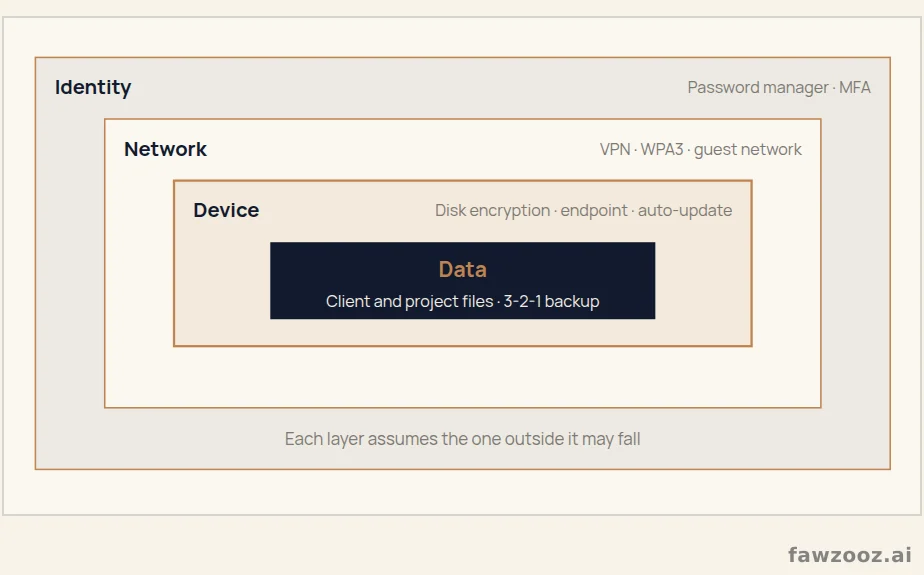
Text in this figure
Identity · Password manager · MFA · Network · VPN · WPA3 · guest network · Device · Disk encryption · endpoint · auto-update · Data · Client and project files · 3-2-1 backup · Each layer assumes the one outside it may fall · Figure 19
Securing networks
- Virtual private networks (VPN): Mandatory for accessing any work resources; they encrypt all traffic and create a secure tunnel even on insecure networks.
- Securing home Wi-Fi: Clear instructions: change the router’s default password, use WPA2 or WPA3 encryption, and update the firmware regularly.
Strengthening device security
- Endpoint protection: Reputable, up-to-date antivirus and anti-malware software on every device used for work, personal or company-owned.
- Physical security: Cable locks, secure storage, and never leaving devices unattended in public places.
- Encryption: Full-disk encryption on all devices, so data stays inaccessible even if the device is stolen.
Leveraging cloud security
Cloud solutions offer powerful tools for securing data and enabling collaboration. When choosing a provider, look for:
- Data encryption: Full encryption in transit and at rest, at every stage of the data life cycle.
- Granular access controls: Allowing the principle of least privilege: users reach only what their work requires.
- Regular backups: Automated solutions that protect against hardware failure, accidental deletion and ransomware.
- Secure collaboration tools: Secure file sharing and secure communication.
2026 Update
The landscape has moved from the “secure network” to Zero Trust: no connection is assumed safe just because it comes from inside the network; instead, every user’s identity and every device’s health is verified on every request. For distributed teams this is now simpler than building a central VPN.
A Practical Guide for the Secure Freelancer
Freelancers and solo entrepreneurs are the lifeblood of the creative industries, but they work without an IT department’s safety net, so security rests entirely on them. Here are practical steps to protect your business, your clients’ data and your reputation.
Security clauses in your client contracts
Clear communication is the foundation of a good client relationship, and it extends to security. Security clauses protect you and your client by setting clear expectations from the start; ambiguous responsibilities breed disputes when an incident occurs, while the contract clarifies who is responsible for what and demonstrates your professionalism. Sample clauses you can add:
- Confidentiality and data security: “The Freelancer agrees to keep confidential all information provided by the Client and to implement reasonable and appropriate security measures to protect Client data from unauthorised access, use or disclosure, including strong passwords, encrypted storage and secure file transfer methods for all project assets.”
- Data retention and deletion: “Upon project completion and final payment, the Freelancer will securely delete all Client data and project files from their systems within 90 days, unless the Client requests otherwise in writing. The Client is responsible for archiving long-term final deliverables.”
Implementation tip: you do not need to be a lawyer; the aim is to start a conversation and document a shared understanding of how sensitive information is handled.
Securing your home network: your first line of defence
Your home Wi-Fi is the digital front door to your business, and leaving it on default settings is like leaving that door open; a neighbour or nearby attacker could break in, eavesdrop on your traffic or reach your devices. A step-by-step guide to a more secure router:
- Change the default admin password: Every router ships with a username and password such as “admin/password”, and it is the first thing an attacker tries. Log into the admin panel and change it immediately.
- Enable WPA3 encryption: The best option, with WPA2 as the minimum. Avoid the outdated WEP and WPA.
- Change the network name (SSID): Avoid a name that identifies you or your address, such as “Sarah’s Design Studio” or “Flat 4B”. Choose a generic name.
- Create a guest network: For smart home devices such as TVs and speakers and for visitors, isolating your work devices from less secure ones and stopping any breach from spreading.
The golden rule: always use a VPN
A virtual private network is an essential tool for every freelancer: an encrypted tunnel for all your traffic, so an attacker on the same public Wi-Fi cannot intercept or read your data. Examples include NordVPN, known for its speed and strong features when uploading and downloading large files, and ProtonVPN, from the makers of ProtonMail, with a strong focus on privacy and a trustworthy free tier with some limits.
Using public Wi-Fi safely
Working from a café or airport is common among creatives, but public networks are insecure and a prime target for data thieves. Best practices:
- Turn off sharing: Disable file sharing on your computer before connecting to a public network.
- “Forget” the network: When you are done, tell your device to forget it so it does not reconnect automatically without your knowledge.
- Treat every network as public: Even password-protected networks in a hotel or client office are untrusted; use a VPN everywhere outside your secured home network.
From the Field
The most dangerous device in a freelancer’s home is not their computer but the cheap smart camera on the same network. A guest network takes two minutes and isolates that risk completely.
Lessons Learned
- 1Remote work moves the security perimeter from the office to every device and network.
- 2A VPN, disk encryption and endpoint protection are a non-negotiable minimum.
- 3Security clauses in the contract protect freelancer and client alike.
- 4A secured router and a guest network are the first line of defence at home.
Tip: use ← → to move between sections.