

Chapter 15
15Securing Specific Creative Workflows
“Security that fits everyone fits no one.”
The core principles of information security are universal, but how they are applied varies greatly between disciplines. A film editor’s challenges are not those of a social media manager or a brand agency, and a “one size fits all” approach leaves critical gaps. This chapter offers tailored guidance for three common workflows, moving from general principles to specific controls you can apply directly in daily work.
For Film and Video Production Teams
Film and video work runs on tight deadlines, huge files and sensitive, time-critical content, and a leak of pre-release footage means severe financial consequences and reputational damage. Security must therefore be part of the production pipeline, from the set to the final export.
Key assets
- Pre-release footage: dailies and rough cuts.
- Final master files.
- Scripts and storyboards.
- Personal information of clients and crew.
- Visual effects (VFX) assets and project files.
Securing footage on set
- Encrypted hard drives: Hardware-encrypted external drives such as the Aegis Padlock series for recording and transporting footage, so content stays locked if a drive is lost or stolen in transit.
- Controlled access: One person, the digital imaging technician (DIT), is responsible for managing and backing up footage, with a defined list of who may handle the drives.
- Secure offloading: In a private, secure location rather than a public one, using a dedicated, fully air-gapped computer for the initial transfer and verification.
Moving large files to post-production
- Professional transfer services: For terabytes of data, use services such as MASV or Aspera, built to deliver huge media fast, encrypted and reliably, and avoid consumer cloud storage for dailies.
- Shipping drives: A reputable courier with tracking, and never write the drive’s contents on the package. Consider splitting the project across several drives shipped separately to limit the impact of losing one shipment.
Securing the editing bay
- Physical security: An access-controlled room entered only by authorised staff, with windows covered against prying eyes.
- Network isolation: The main editing workstation, especially the one holding master files, on an isolated network segment, or ideally fully disconnected from the internet.
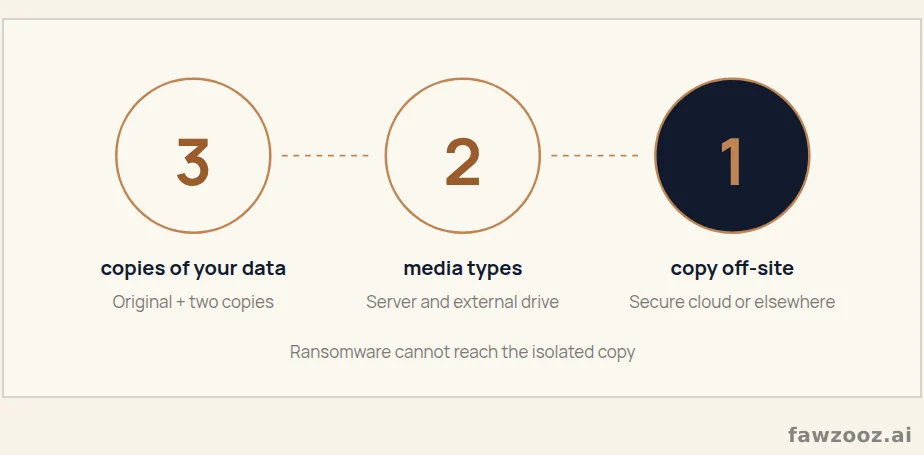
- The 3-2-1 backup rule: Three copies of the data, on two different types of storage media (for example an internal server and an external drive), with one copy off-site (a secure cloud service such as Backblaze or a separate physical location).
Text in this figure
3 · copies of your data · Original + two copies · 2 · media types · Server and external drive · 1 · copy off-site · Secure cloud or elsewhere · Ransomware cannot reach the isolated copy · Figure 20
For Graphic Design and Branding Agencies
Design and branding agencies are custodians of their clients’ visual identities, and their logos, guidelines and campaign materials are of high value and confidentiality.
Key assets
- Client logos and brand guidelines.
- Licensed font libraries and paid stock photo accounts.
- Unpublished campaign designs and concepts.
- Client feedback portals and correspondence.
Protecting client brand assets
- Centralised asset management: A digital asset management (DAM) system or a well-organised, access-controlled cloud folder structure such as Google Drive or Dropbox for Business, with designers not storing master files on their own machines.
- Granular access control: Permissions per client and per project; the designer on client A’s project does not reach client B’s logo files.
- Invisible watermarks: For high-value concepts and prototypes, as in Chapter 9, to track and prove ownership if they leak.
Securing paid font and stock accounts
- Team accounts: Team plans for services such as Adobe Fonts and Getty Images instead of personal accounts, with central billing and user management.
- A team password manager: Such as 1Password for Business or Bitwarden Teams, to share access without revealing passwords, and revoke it instantly when someone leaves.
Managing client feedback portals securely
- Professional review tools: Such as Filestage or Frame.io instead of emailing PDFs back and forth; they are more secure, require the client to log in, and keep feedback and version history in one place.
- Password-protect every draft: And tell the client the password through a separate channel.
- Disable public links: Avoid “share with anyone who has the link” for client drafts, as it exposes your work to whoever finds the link.
For Digital Marketing and Social Media Agencies
These agencies manage their clients’ public voice and often handle sensitive campaign data, so any security mistake means immediate, public brand damage.
Key assets
- Credentials for clients’ social media accounts.
- Audience data from campaigns, such as email lists and contest entries.
- Ad spend budgets and performance analytics.
- Unpublished marketing strategies and content calendars.
Managing clients’ social media accounts
- Never share direct passwords: Never ask a client for their username and password. Use the platform’s team management features, such as Meta Business Suite, to request access to Facebook and Instagram pages as a partner.
- A social media management tool: Such as Hootsuite, Sprout Social or Buffer, which connect accounts through secure API connections (OAuth) so you never touch the client’s password, and let you assign specific accounts to specific team members.
- Mandatory two-factor authentication: On every account you manage for your agency or your clients; it is the most important defence against account takeover.
Protecting campaign audience data
- Secure collection: Forms and landing pages use HTTPS, and collected data is stored in an encrypted, access-controlled database or spreadsheet.
- Data minimisation: Collect only what you need; if an email suffices for the newsletter, do not ask for a phone number and home address.
- Compliance with data protection laws: Transparency about use, a clear privacy policy, explicit consent, and secure deletion once the campaign’s purpose ends.
Preventing ad and campaign account hijacking
- Monthly reviews: Of who can access clients’ ad accounts such as Google Ads and Facebook Ads Manager, removing former employees and partners immediately.
- Spend alerts: Alerts for unusual spending activity, an early sign that an account has been compromised and is being used for ad fraud.
- Vigilance against phishing: Ad agencies are a prime target for highly targeted phishing aimed at stealing ad account credentials, so train your team to recognise and report it.
2026 Update
The fourth workflow that has entered every agency is production with generative AI. Its new assets are prompt libraries, custom models trained on a client’s style, and reference files uploaded to tools. We return to it in detail in Chapter 18.
Lessons Learned
- 1Every creative workflow has its own assets and controls.
- 2In production: encrypted drives, one person in charge of footage, and the 3-2-1 rule.
- 3In design: centralised asset management, per-client access, and no public links.
- 4In marketing: no shared passwords, two-factor authentication, and data minimisation.
Tip: use ← → to move between sections.