

Chapter 9
09Security Controls in Creative Environments
“A good control protects you without making you feel it is standing in your way.”
After risks are identified and assessed comes the decisive step: choosing a tailored set of controls that effectively mitigates them. This chapter offers practical guidance that ensures controls not only comply with the standard but also support creative workflows. The goal is a secure environment where creativity thrives without being stifled by excessive or burdensome measures.
The Four Control Themes of ISO 27001:2022
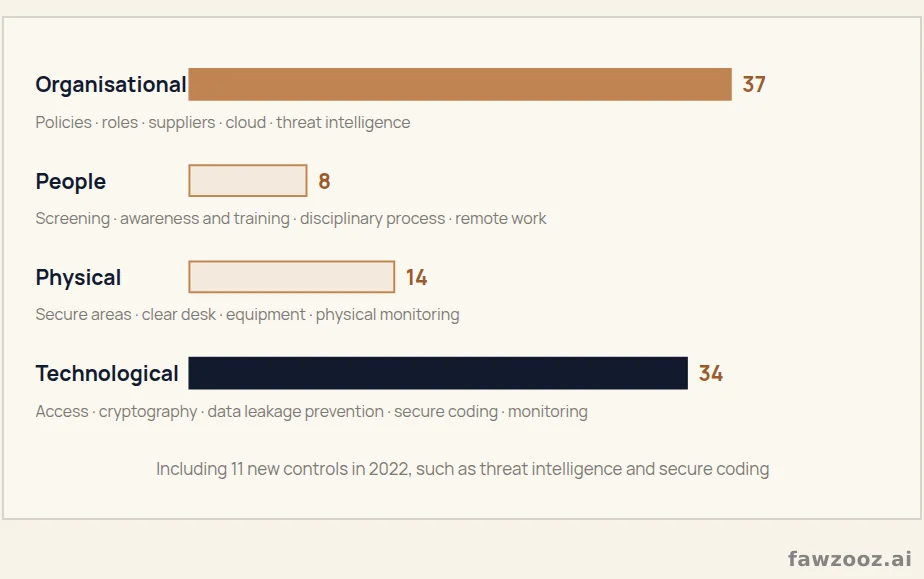
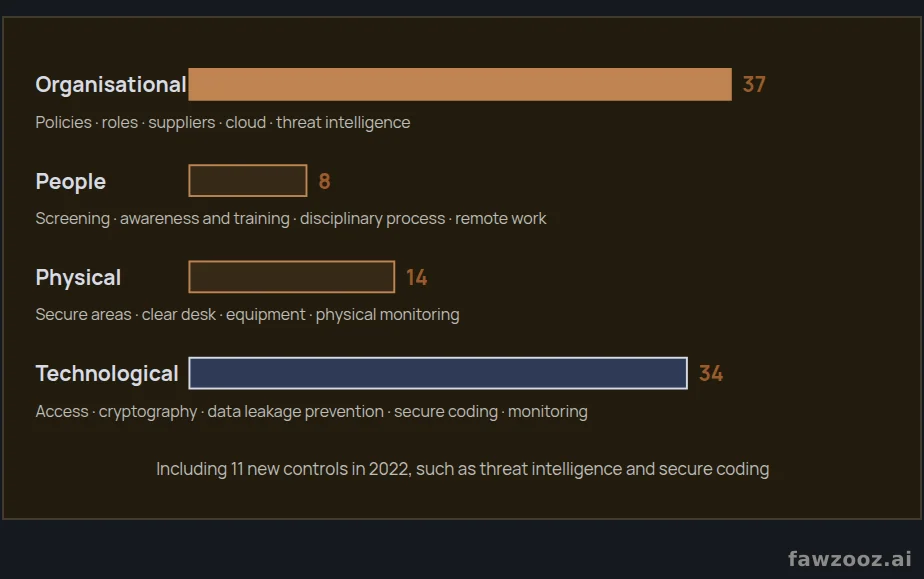
The standard classifies its reference controls in Annex A into four themes: organisational, people, physical and technological, for a total of 93 controls. Each control is selected or excluded based on risk, and the decision is justified in the Statement of Applicability.
Text in this figure
Organisational · 37 · Policies · roles · suppliers · cloud · threat intelligence · People · 8 · Screening · awareness and training · disciplinary process · remote work · Physical · 14 · Secure areas · clear desk · equipment · physical monitoring · Technological · 34 · Access · cryptography · data leakage prevention · secure coding · monitoring · Including 11 new controls in 2022, such as threat intelligence and secure coding · Figure 11
Organisational controls
They establish the governance and overall framework of the system, ensuring clear accountability and the application of policies and procedures.
- Information security policies: A set of clear, concise policies communicated to all employees and relevant external parties.
- Roles and responsibilities: Clear assignment so that everyone understands their part in protecting assets.
- Asset management: Identifying and classifying all information assets, from digital content and client data to proprietary tools and software.
- Supplier relationships: Managing relationships with suppliers and freelancers to ensure they protect the assets they access or manage.
People controls
- Screening: For new employees, especially those who will access sensitive information.
- Awareness, education and training: Regular programmes on policies, emerging threats and secure practices, doubly important where collaborative tools change rapidly.
- Disciplinary process: A clear, published process for those who violate information security policies.
Physical controls
- Secure areas: Entry control systems protecting places where sensitive information is stored and processed.
- Clear desk and clear screen: Desks and screens free of sensitive information when unattended, especially important in open-plan studios.
- Equipment security: Protecting laptops and servers from theft and damage.
Technological controls
- Access control: Restricting access to authorised people, vital in agencies with extensive external collaboration.
- Cryptography: Protecting the confidentiality and integrity of data, especially in transit over insecure networks or stored on portable devices.
- Operations security: Sound procedures ensuring the correct and secure operation of information processing facilities.
- Communications security: Securing information in networks and their facilities, critical for teams collaborating remotely.
- System acquisition, development and maintenance: Security as an integral part of information systems and their life cycle.
- Information security incident management: A consistent, effective approach to managing incidents, including reporting events and weaknesses.
2026 Update
Of the eleven new controls in 2022, several affect creatives directly: information security for use of cloud services (5.23), information deletion (8.10), data masking (8.11), data leakage prevention (8.12), web filtering (8.23), secure coding (8.28) and threat intelligence (5.7).
Security Tools for the Modern Creative
Understanding controls is the first step, but applying them in daily work is what really protects. The right tools make security seamless rather than a burden. These are essential categories linked to the controls above. The names mentioned are illustrative examples, not exclusive recommendations.
Password managers: your digital vault
A creative manages dozens of accounts: cloud storage, social scheduling, stock photo sites and client portals. A password manager is an encrypted vault that allows a unique, complex password for every service without memorising it. It directly addresses the access control requirement by preventing weak or reused passwords, a leading cause of breaches.
- 1Password: An easy interface and the “Watchtower” feature that alerts you to compromised passwords and sites that support two-factor authentication, across Mac, Windows, iOS and Android.
- Bitwarden: Open source with a strong free tier, ideal for freelancers and small teams, with secure sharing and cross-device sync.
Implementation tip: enable your password manager’s browser extension, so logging in and creating a strong password take a single click.
Secure file transfer services
Sending large files by email is impractical and insecure, as ordinary attachments are not end-to-end encrypted. Secure transfer services support the cryptography and communications security controls and protect your intellectual property on its way to the client, collaborator or printer.
- WeTransfer Pro/Premium: Password protection, custom expiry dates and a full history of what you sent and received.
- Tresorit: End-to-end encrypted sharing for highly sensitive projects, showing who accessed a file and when.
Implementation tip: protect every sensitive file with a password, and send it through a separate secure channel such as a Signal message or a phone call.
Cloud storage security
Services such as Google Drive, Dropbox and Adobe Creative Cloud are the backbone of modern creative work, but their default settings are not the most secure. Configuring them correctly is part of asset management and operations security. A settings checklist:
- Enable two-factor authentication: The single most important step: a second form of verification, such as a code from your phone, alongside the password.
- Review sharing permissions: Never share a folder with “anyone with the link”. Use specific email invitations and “view only” unless editing is needed, and periodically revoke access for former clients and collaborators.
- Check third-party apps: Review apps connected to your account and remove any you no longer use or trust.
Digital watermarking: your invisible signature
Proving ownership of a digital file is hard for photographers, illustrators and videographers. Digital watermarking tools embed an imperceptible signature that stays with the file even after copying, compression or conversion, so ownership can be tracked and proven. It is a specific control for protecting intellectual property, the cornerstone of the creative industries.
- Digimarc: Invisible watermarks for images, with Photoshop plugins that embed them on save.
- IMATAG: Robust against cropping and compression, tracking where your images appear online without permission.
Implementation tip: use invisible watermarks on drafts sent to clients and on images published online; they do not degrade quality and add a strong layer of protection.
2026 Update
Add to the toolbox today: passkeys in place of passwords where available, and the Content Credentials standard (C2PA), which attaches a verified record of an image’s origin and edits, now supported by major design tools, cameras and some generative tools.
Lessons Learned
- 193 controls in four themes: organisational, people, physical and technological.
- 2A control is chosen based on a real risk and justified in the Statement of Applicability.
- 3A password manager and two-factor authentication are the highest-impact, lowest-cost controls.
- 4Secure transfer, correct cloud configuration and watermarks protect creative work in motion.
Tip: use ← → to move between sections.